
Managing supplier information is one of the core parts of running any business efficiently. Whether you’re dealing with hundreds of vendors or just a few trusted partners, having a well-organized system makes a big difference in your overall operations. This is where the Supplier Master in ERPNext comes into play. It acts as a central record where you can manage every detail about your suppliers—from their basic contact information to tax details, credit limits, and payment terms.
In this blog, we’ll walk you through some of the most useful features of the Supplier Master in ERPNext, including how it integrates with India Compliance for GSTIN auto-fetch, grouping of suppliers, setting default payment terms, and mapping tax withholding categories. We’ll also share a few additional features that make this module even more powerful.
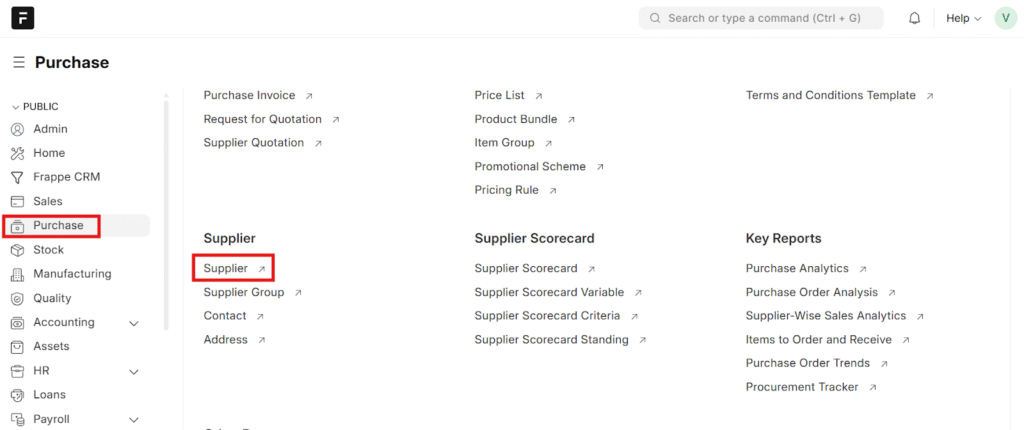
You can navigate to the Supplier master from the Purchase Module Dashboard
Auto-Fetching Supplier Details Using GSTIN
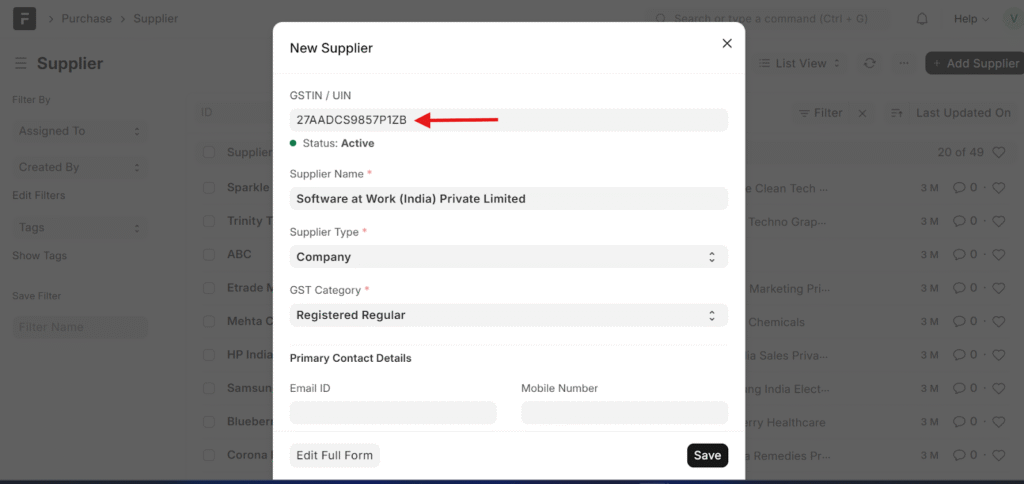
If you’re managing suppliers in India, this feature can save you a lot of time and effort. ERPNext, when integrated with the India Compliance application, allows you to automatically fetch supplier details just by entering their GSTIN.
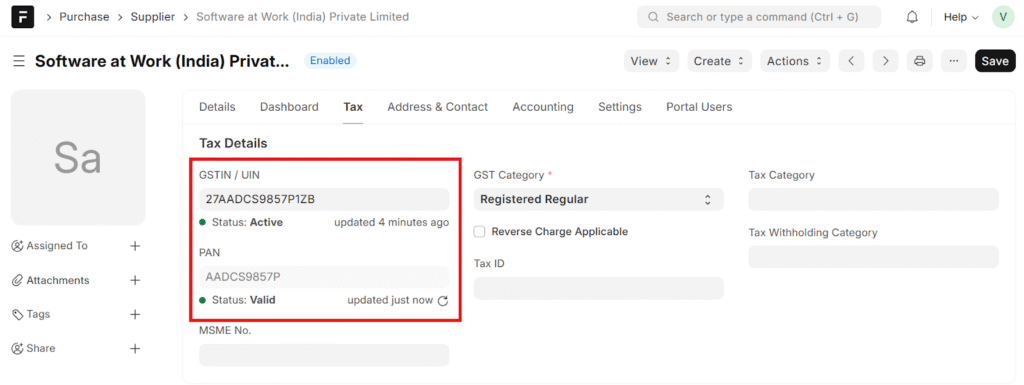
Once you type in the GSTIN number, ERPNext connects with the GST portal to fetch all relevant information such as the supplier’s legal name, trade name, address, and state code. What makes this feature so handy is that it reduces manual data entry errors and ensures that your supplier database always contains accurate information. It’s also a simple way to ensure compliance with government regulations, as the data fetched directly comes from official sources.
Grouping Suppliers for Better Organization
If your company deals with multiple types of suppliers say raw materials, transport services, packaging vendors, or consulting partners it becomes useful to categorize them. ERPNext offers Supplier Groups, allowing you to organize suppliers into logical categories.
When creating a new supplier, you can assign it to a pre-defined group such as “Local Vendors,” “Import Suppliers,” or “Service Providers.” You can also define custom groups depending on your business structure. This grouping helps in analytics and reporting too. For instance, you can easily generate reports to see expenses based on supplier groups or track how much you are spending on domestic versus international suppliers.
Moreover, supplier grouping can also be used to define default settings for each group. For example, all suppliers under a particular group might have the same payment terms or tax rules, reducing repetitive data entry when creating new supplier records.
Setting Default Payment Terms
Another important aspect of supplier management is defining payment terms. ERPNext allows you to set default payment terms for each supplier directly in the Supplier Master. This is especially useful when you work with multiple suppliers who follow different credit or payment cycles.
For example, one supplier might expect payment within 15 days, while another allows 30 days credit. Instead of remembering this every time you create a purchase invoice, you can simply map the payment term in the supplier record. ERPNext will automatically use that default whenever you make transactions with that supplier.
This not only saves time but also helps maintain a transparent and disciplined payment process. Finance teams can also filter out pending invoices or track upcoming payments easily based on these terms.
Mapping Tax Withholding Categories
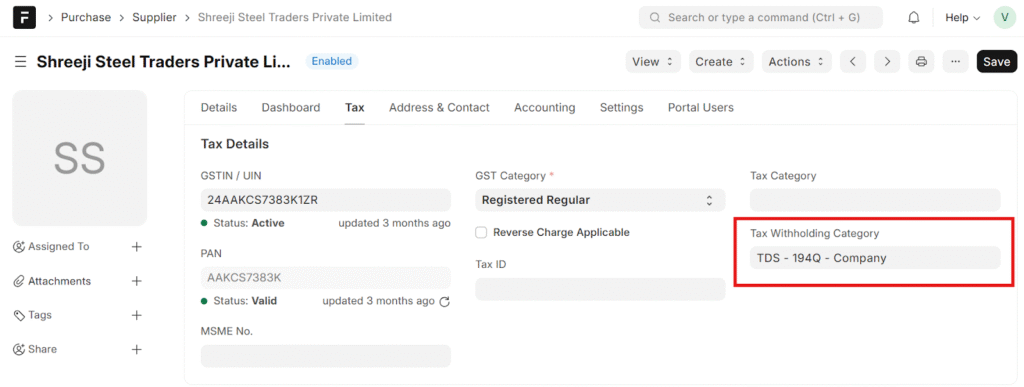
In businesses that fall under TDS (Tax Deducted at Source) provisions, it becomes necessary to define tax withholding categories for suppliers. ERPNext makes this easy by allowing you to map the tax withholding category directly in the supplier’s master record.
When you assign a specific TDS category to a supplier, ERPNext will automatically apply that tax rate whenever a transaction is created. It ensures that the right tax percentage is deducted, helping your accounts stay compliant with legal requirements.
This feature especially helps companies working with freelancers, consultants, or service providers where different TDS categories may apply based on the nature of the transaction.
Additional Features Worth Exploring
Besides the above, the Supplier Master in ERPNext includes several other fields and functionalities that make it a comprehensive module for supplier management:
- Default Currency: Define the currency in which you transact with each supplier, useful especially for international trade.
- Contacts and Addresses: Link multiple contacts and addresses to a supplier. This is helpful when the billing and shipping addresses differ.
- Bank Account Details: Store supplier bank information for quicker and mistake-free payment processing.
- Supplier Portal Access: If you provide access to suppliers through ERPNext’s portal, they can view their invoices, orders, and payments on their own, reducing back-and-forth follow-ups.
Each of these features adds flexibility and saves valuable time, reducing manual errors in data handling.
Why the Supplier Master Matters
The Supplier Master isn’t just a database—it’s the starting point of all your procurement transactions. Whether you are issuing purchase orders, recording supplier invoices, or managing payments, the details stored here form the foundation for each of these processes. Keeping it complete and updated ensures the smooth functioning of your entire supply chain within ERPNext.
By taking advantage of automation features like GSTIN autofetch, supplier grouping, and pre-defined payment and tax rules, your company can significantly improve data accuracy and reduce administrative efforts.
In short, the Supplier Master might look simple at first glance, but it plays a vital role in keeping your ERPNext system efficient, organized, and compliant.
Frequently Asked Questions (FAQ) –
1. What is Supplier Master in ERPNext?
The Supplier Master in ERPNext is a centralized record used to store and manage all supplier-related information, including contact details, GSTIN, payment terms, tax withholding categories, bank details, and currency. It acts as the foundation for all purchase, invoice, and payment transactions.
2. Why is Supplier Master important in ERPNext?
Supplier Master is critical because all procurement transactions—such as purchase orders, purchase invoices, and supplier payments—depend on the data stored here. A well-maintained Supplier Master ensures accurate accounting, GST compliance, proper TDS deduction, and smooth vendor management.
3. How does GSTIN auto-fetch work in ERPNext?
When ERPNext is integrated with the India Compliance app, entering a supplier’s GSTIN automatically fetches details from the GST portal, including:
- Legal business name
- Trade name
- Registered address
- State code
This reduces manual data entry, improves accuracy, and ensures compliance with Indian GST regulations.
4. Is GSTIN auto-fetch mandatory for Indian suppliers?
No, GSTIN auto-fetch is not mandatory. However, it is highly recommended for Indian businesses to maintain accurate and government-verified supplier data, especially for GST returns and audits.
5. What are Supplier Groups in ERPNext?
Supplier Groups allow businesses to categorize suppliers based on type, location, or services—such as local vendors, import suppliers, service providers, or transporters. Grouping helps in better reporting, expense analysis, and setting default rules.